Fruit Merge 3D Puzzle offers a calm yet engaging experience that is easy to pick up but hard to put down. The bright 3D graphics and smooth performance on any device make it a pleasure to play. The simple mechanic of merging identical fruits into larger ones becomes increasingly strategic as the container fills. It is perfect for short breaks or longer sessions, and the lack of time limits reduces stress. A great choice for puzzle fans of all ages.
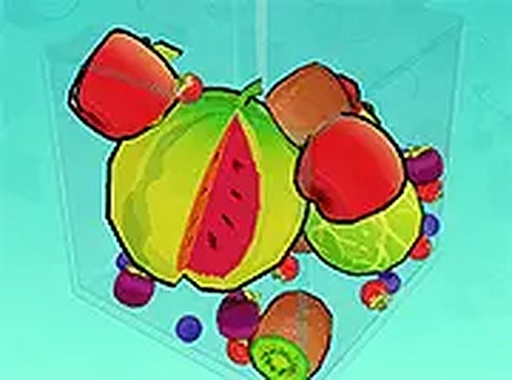
Fruit Merge 3D Puzzle is a colorful and engaging online puzzle game that invites players to think ahead while enjoying a relaxing experience. The core objective is simple: drop fruits into a container and watch as identical fruits touch and merge into larger ones. Each successful merge brings you closer to the ultimate goal of creating the largest watermelon. The game presents a calm yet stimulating challenge, as every drop matters. If three fruits fall out of the container, the round ends, adding a gentle layer of strategy. The bright 3D graphics and smooth performance make it accessible on any device, from desktop computers to mobile phones. No downloads are required, so you can start playing instantly in your browser. This game is suitable for players of all ages and fits well into short breaks or longer play sessions. Its straightforward mechanics are easy to learn, but mastering the placement and timing of each fruit drop provides ongoing enjoyment. The game encourages careful planning and spatial awareness, making it a thoughtful pastime for anyone who enjoys puzzles.
To begin, simply tap or click to drop a fruit into the container. As fruits land, they interact with each other. When two fruits of the same type touch, they merge into a larger fruit. For example, two small fruits combine to form a medium fruit, and two medium fruits combine to form a large fruit. The process continues until you create fruits like apples, oranges, and eventually watermelons. The key is to plan your drops carefully to keep the pile low and avoid spills. If three fruits fall out of the container, the game ends. The controls are intuitive and work on both desktop and mobile devices. You can use full screen mode for a better view. No downloads or installations are needed; just open your browser and start playing.
This puzzle game is free to play with no hidden costs. It features bright 3D graphics that are clear and appealing. The design is mobile-friendly, working smoothly on phones and tablets. Full screen mode provides an immersive experience. No downloads or installations are required, and performance is smooth on most browsers. The simple controls allow anyone to learn quickly and start playing immediately.
Plan your drops ahead to keep the pile low and avoid spills. Focus on merging smaller fruits first to create more space. Try to keep the center of the container clear for easier merges. Practice regularly to improve your timing and placement. Stay calm and think before each drop to maximize merges and progress toward the largest watermelon.








Player Comments
Sign in to comment
You must be logged in before posting a review or rating.
No account? Create one
No comments yet. Be the first to comment!