Animal Layer Sorting Puzzle offers a simple yet engaging gameplay experience that is perfect for puzzle enthusiasts of all ages. The colorful animal graphics are visually appealing, and the increasing difficulty keeps the challenge fresh. The undo button is a helpful feature that allows for experimentation without penalty. The game runs smoothly on both desktop and mobile browsers, making it easy to play anytime. Overall, it is a well-designed puzzle game that provides a satisfying mental workout.
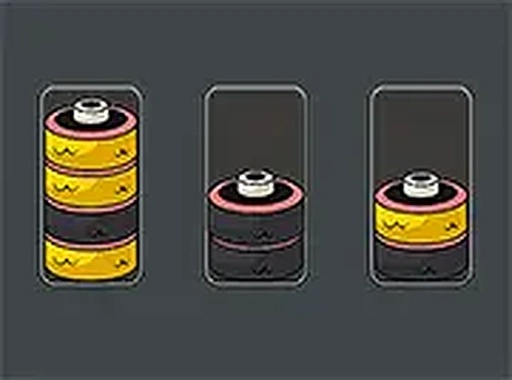
Animal Layer Sorting Puzzle is a free online game that challenges players to organize colorful animal layers into matching stacks. The game presents several frames, each containing animals of different colors. The main goal is to rearrange these layers so that every frame holds animals of a single color. While the concept sounds simple, the puzzle requires careful planning and logical thinking. Players can only move a layer to an empty frame or onto a frame where the top layer matches its color. This rule adds a layer of strategy, making each move count. The game is designed for players of all ages and offers a relaxing yet engaging experience that sharpens the mind. It can be played directly in a browser without any downloads or sign-ups.
To play Animal Layer Sorting Puzzle, players start by looking at the frames filled with animal layers of different colors. The task is to sort them so each frame contains only one color. Players click or tap on a layer to pick it up, then move it to another frame. A layer can only be placed on an empty frame or on top of a layer that matches its color. If the top layer is a different color, the move is not allowed. Players must plan their moves carefully to avoid getting stuck. The game becomes more challenging as progress is made, with more layers and colors to manage. An undo button is available to correct mistakes. The game works smoothly on both desktop and mobile browsers.
Colorful animal graphics make the game visually appealing. Logical puzzle mechanics encourage strategic thinking. Family-friendly gameplay is suitable for all ages. Increasing difficulty keeps the challenge fresh. An undo button helps correct mistakes. The game works on desktop and mobile browsers without requiring any downloads.
Start by identifying frames that are already close to being sorted. Focus on moving layers to empty frames to create more flexibility. Always check the top color of a frame before moving a layer there to avoid getting stuck. Use the undo button freely to experiment with different strategies. As the number of layers and colors increases, take time to plan several moves ahead. Practice regularly to improve sorting speed and logical thinking.









Player Comments
Sign in to comment
You must be logged in before posting a review or rating.
No account? Create one
No comments yet. Be the first to comment!