Basketball Physics Hoops delivers exactly what its name promises: chaotic, physics-driven basketball action. The simple controls make it easy for anyone to play, while the random modifiers and wobbly ragdoll characters ensure no two matches are the same. The local two-player mode is a highlight, perfect for friendly competition. It is a lighthearted, family-safe game that prioritizes laughter over realism.
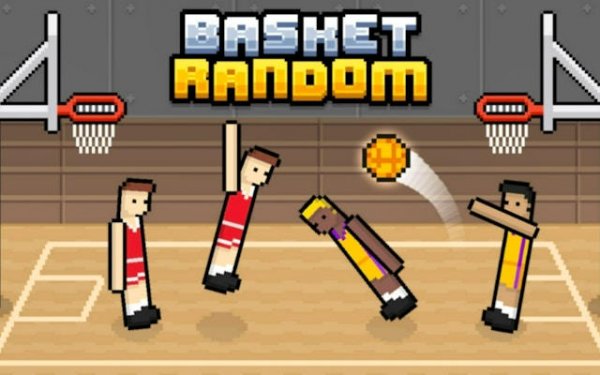
Basketball Physics Hoops is a physics-based arcade basketball game that focuses on chaotic and unpredictable fun rather than realistic simulation. Players control wobbly ragdoll characters in fast-paced matches where the ball and players behave in unexpected ways. The core objective is to score points by getting the ball into the opponent's hoop, with the first team to reach 5 points winning the match. The game stands out for its simple controls and ever-changing gameplay, making each round a unique and humorous experience. It is designed to be accessible for all ages and skill levels, emphasizing laughter and enjoyment over complex strategies. The dynamic physics engine creates unpredictable movements and interactions, while random modifiers can change rules or the environment during a match, adding an element of surprise. The game offers dual modes: solo play against AI opponents and local two-player competition, making it ideal for casual gaming sessions.
Controls are intentionally simple, making the game easy to pick up. In solo or versus AI modes, a single button is used to jump and shoot. For local two-player matches, each player uses a different key to control their team. Each side has two ragdoll players that move by tilting and jumping. To gain possession of the ball, players simply make contact with it using their arms. Stealing is done by touching an opponent's arms near the ball. Scoring is achieved by shooting the ball into the opposing team's hoop. The first team to reach 5 points wins the match. Players typically focus on timing their jumps and shots to account for the wobbly character motions, and coordinating with a teammate can help cover more of the court.
Key features include a dynamic physics engine that creates unpredictable movements and interactions. Random modifiers can change rules or the environment during a match, adding an element of surprise. The game is designed to be accessible for all ages and skill levels due to its straightforward controls. It offers dual game modes: solo play against AI opponents and local two-player competition. The emphasis is on fun and laughter rather than complex strategies, making it ideal for casual gaming sessions. The game may include various characters or teams, though specific details are not provided. The physics-based gameplay ensures that no two matches are exactly alike, providing replay value.
To succeed in Basketball Physics Hoops, focus on adapting to the ever-changing physics rather than trying to control every movement. Practice timing your jumps and shots to account for the wobbly character motions. In two-player mode, coordinate with your teammate by alternating jumps to cover more of the court. Stealing the ball can be as effective as scoring, so watch for opportunities to bump into opponents near the ball. Most importantly, stay relaxed and enjoy the unpredictable nature of the game—it is designed for fun above all.










Player Comments
Sign in to comment
You must be logged in before posting a review or rating.
No account? Create one
No comments yet. Be the first to comment!